How to Let Visitors Submit Events in WordPress (Free)
A community calendar is only as good as what’s on it, and you can’t know about every event in town. The answer is to let users submit events in WordPress themselves — through a form on your site, with you approving what gets published. This guide sets that up with a free plugin in about ten minutes.
What you need
- A WordPress site.
- The free Monthly Events Calendar plugin, version 1.8 or newer. Front-end submission is included; there is no add-on to buy.
Step 1: add the submission form
Create a page called “Submit an event”. Add the Submit an Event block, or paste this shortcode:
[wp_monthly_events_submit]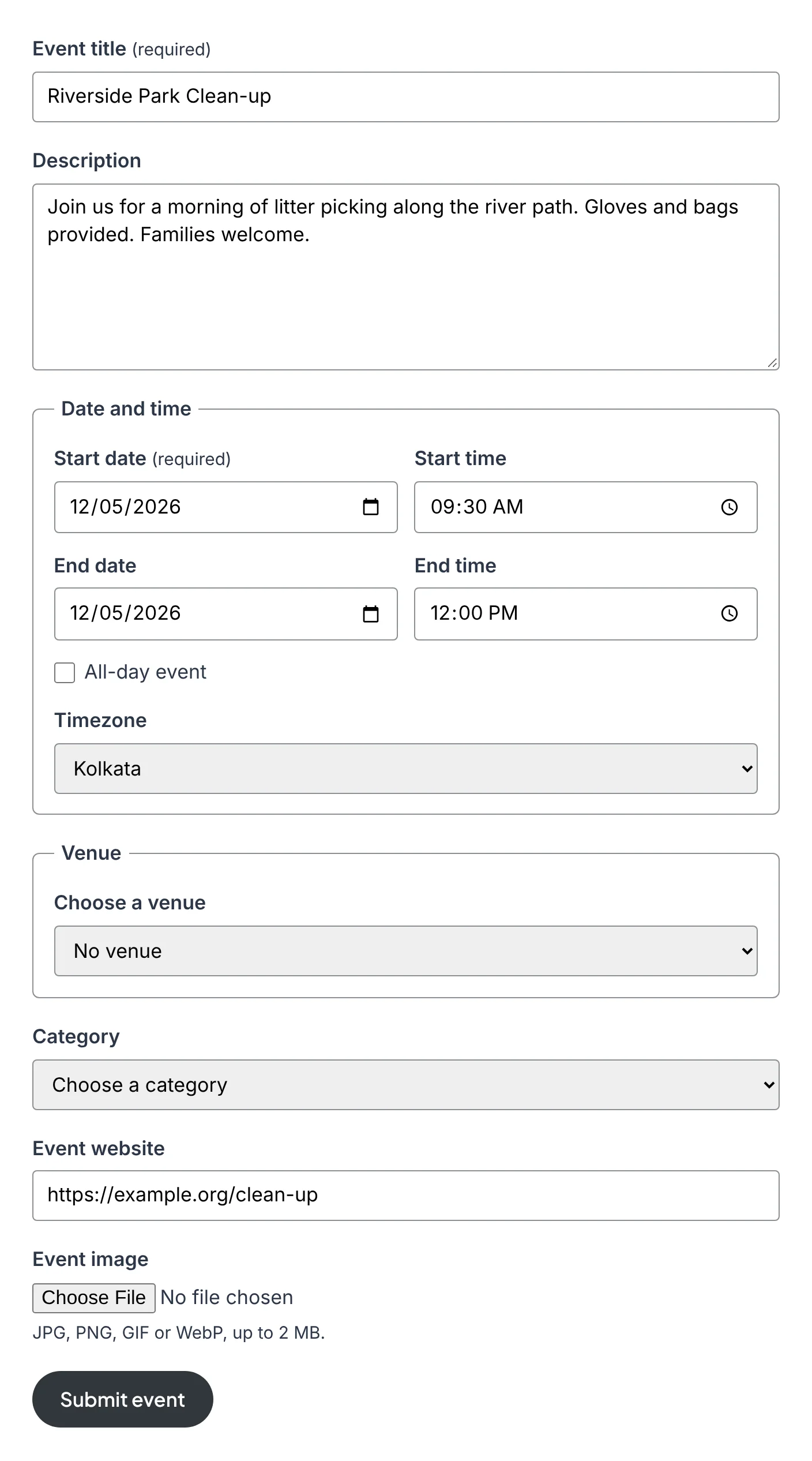
The form asks for a title, description, dates, venue, category, website and image. People fill it in on your site and never see the WordPress dashboard.
Step 2: decide who can use it
Go to Events Calendar → Submissions. You have three sensible setups:
Open to everyone
Tick “Let visitors submit events without logging in”. Visitors give a name and email, and every event waits for your approval.
Members only
Tick “Can submit events” for the Event Submitter role and make it the default role for new users.
Trusted partners
Tick “Publish without approval” for a role, and those people’s events go live at once.
You can mix them: visitors wait for approval while your venue partners publish directly.
Step 3: approve what comes in
Each waiting event arrives as an email with two links, Approve and publish and Reject. One click and it’s done. You can also review everything under Events Calendar → All Events → Pending.
When you approve an event, the person who sent it gets an email with a link to share.
Step 4: tell people about it
- Add “Submit an event” to your main menu, next to the calendar.
- Put a line above the calendar: “Running something? Add it here.”
- Mention it in your newsletter and on your social accounts.
Keeping spam out
Open forms attract bots. The form deals with them quietly: a hidden field that only bots fill in, a check that the form was open for a few seconds, and an hourly limit per visitor. Real people don’t notice any of it, and there’s no puzzle to solve. Because visitors’ events always wait for approval, nothing reaches your calendar without you seeing it first.
Make the form shorter
Short forms get finished. Hide the fields you don’t need:
[wp_monthly_events_submit hide="timezone,website"]Running a music listings page? Send everything from that page’s form to one category, and skip the category question:
[wp_monthly_events_submit category="music"]Then show that category on its own calendar: [wp_monthly_events category="music"].
A simple policy helps
Say on the page what you accept. Two or three lines are enough: which area you cover, what kinds of events, and how long approval usually takes. It saves you rejecting things, and it saves people guessing.
Do people need an account to submit?
Only if you want them to. You choose between logged-in users only and everyone.
Can I edit an event before approving it?
Yes. Open it from the Pending list, fix what you like, and publish it. Publishing approves it.
Can I use my own form plugin instead?
Yes. A form in Gravity Forms or another form plugin can create events with one function. How to connect another form
Keep reading
- How to Show Upcoming Events in WordPress (Homepage, Sidebar or Any Page)
- How to Add an Events Calendar to WordPress (Step by Step)
- How to Add an Events Calendar in Elementor (Free)