
Home Features Google Calendar import
New in 1.7
Import Google Calendar events into WordPress
Keep your schedule where you already keep it. Paste a calendar link from Google Calendar, Outlook or Apple Calendar and Monthly Events Calendar turns it into real events on your site — free, with one-click sync.
Import Google Calendar to WordPress in three steps
- Copy your calendar’s link. In Google Calendar, open Settings, click your calendar and copy “Public address in iCal format” (or “Secret address in iCal format” for a private calendar).
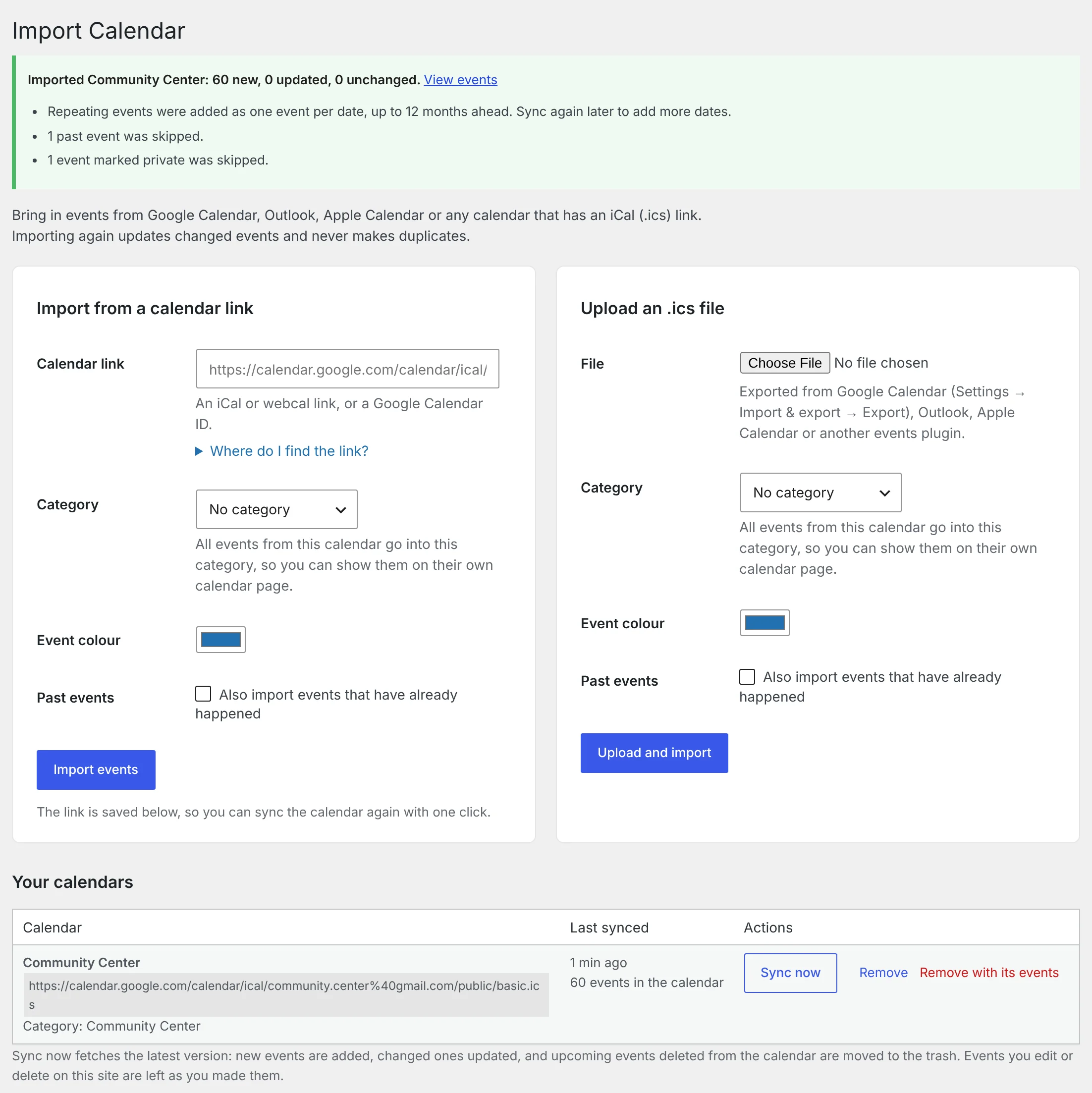
- Paste it into WordPress. Go to Events Calendar → Import Calendar, paste the link, pick a category and a colour, and click Import events.
- Sync when things change. The calendar is saved in a list. Click Sync now whenever you want the latest version.
Works with the calendar you already use
| Calendar | How to import |
|---|---|
| Google Calendar | Public or secret iCal address, a calendar ID, or an embed link |
| Outlook.com and Microsoft 365 | The ICS link from “Publish a calendar” |
| Apple iCloud Calendar | The webcal:// link of a public calendar |
| Any other calendar or events plugin | An iCal (.ics) link, or upload an .ics file |
What comes across
- Times and timezones, including the Windows timezone names Outlook uses. Visitors still see each event in their own local time. How timezones work
- All-day events, as all-day events.
- Locations. A venue is created for each place, and reused the next time. Venues
- Descriptions, with links kept.
- Repeating events. Each date becomes its own event, 12 months ahead, with skipped and moved dates respected.
Events marked private in your calendar are left out, and so are past events unless you ask for them.
Real events, not an embed
An embedded Google Calendar is a window onto Google. Imported events are part of your site: each one has its own page and address, appears in the month, list and day views, can be found by search engines, and gets an Add to Calendar button. Embed or import? A comparison
Put each calendar in its own category and you can show it on its own page:
[wp_monthly_events category="community-center"]Sync without surprises
Importing the same calendar again never makes duplicates. When you click Sync now:
- new events are added and changed events are updated;
- upcoming events deleted from the calendar are moved to the trash;
- events you edited on your site are left as you changed them;
- events you deleted on your site stay deleted.
Syncing is a button you click. Automatic sync on a schedule is planned for the Pro add-on — see the roadmap.
Does my Google Calendar have to be public?
No. A private calendar has a “Secret address in iCal format” that works too. Anyone with that address can read the calendar, so keep it to yourself; it’s stored on your site and never shown to visitors.
Can I import more than one calendar?
Yes. Each one is saved separately with its own category and colour.
Will changes I make in WordPress go back to Google?
No. The import is one-way, from your calendar to your site.
More features
Event submissions
Let members or visitors send events to your calendar, and approve them from your inbox.
Monthly calendar view
A clean month grid with colour-coded events, hover previews and one-click jumps to any day.
List view
Upcoming events in date order with venue, time and description — ideal for homepages.