
Feature
Monthly events calendar view for WordPress
Give visitors a full month of events in a clean, tappable grid. The monthly view is the heart of WP Monthly Events — add it to any page with a single shortcode, and it stays fast on every device.
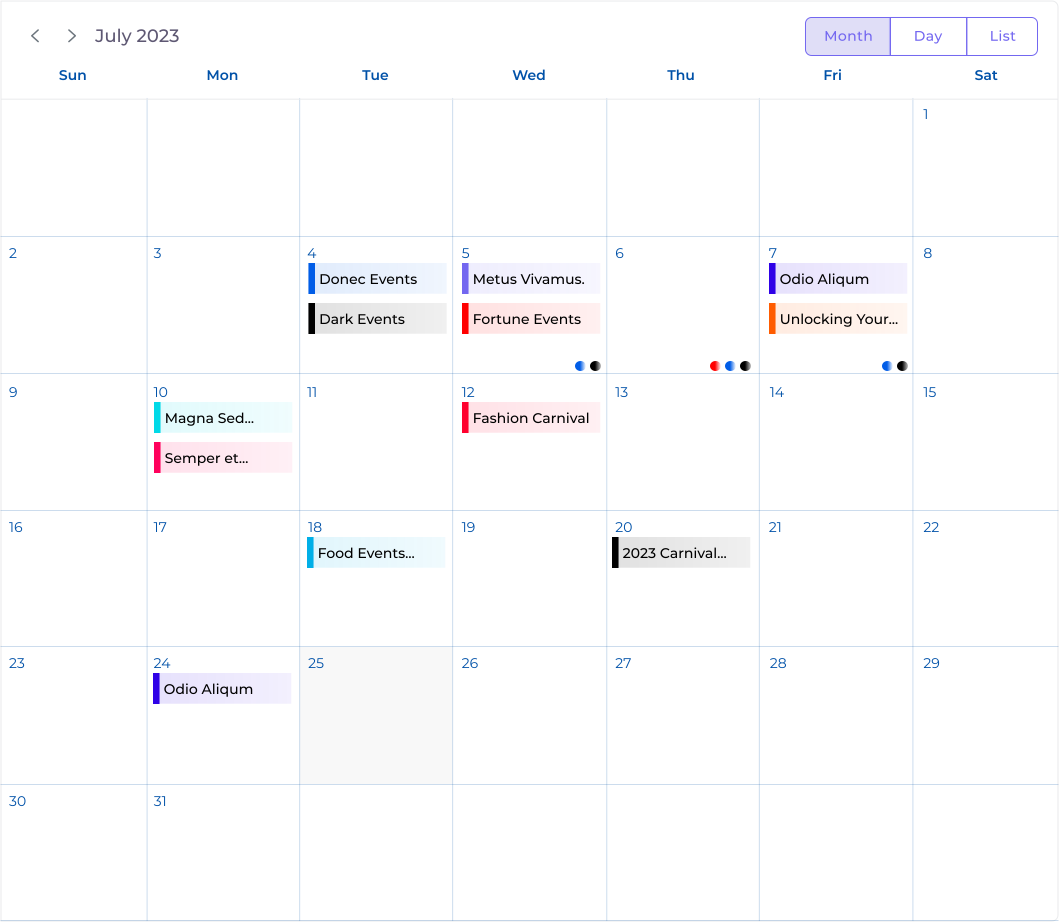
What the monthly view looks like
The monthly calendar view displays your events in a familiar month-at-a-glance grid. Each day shows the events scheduled for it, and visitors can click any event to open its full details — date, time, venue, organizer, and description. Navigation arrows let people move between months without reloading the page, and days that have events are highlighted so your calendar is always easy to scan. The whole grid adapts to phones and tablets automatically, so it looks right whether someone visits from a desktop or their phone.
How to add the monthly calendar
Adding a full monthly calendar takes three steps and no template editing:
- Create or edit the page where you want the calendar to appear.
- Add the shortcode
[monthly_events]where you want it to show. - Publish the page. Your events appear instantly, pulled live through the WordPress REST API.
That’s the entire setup. There’s no separate calendar builder to learn and no code to touch — if you can paste a shortcode, you can publish a calendar.
Customization options
Highlight colors
Give each event a highlight color so different event types stand out at a glance. Visitors can tell a workshop from a social gathering before they even click.
Venues and organizers
Attach a venue and one or more organizers to every event. Attendees see exactly where to go and who’s running things, right inside the event details.
Featured images
Add a featured image to each event so your calendar looks vibrant instead of like a plain spreadsheet of dates.
Built-in search
Visitors can search events by title straight from the calendar, so they find what they’re looking for without scrolling through every month.
Mobile and timezone handling
Every calendar is mobile responsive out of the box — the month grid reflows cleanly on smaller screens so nothing is cut off or hard to tap. The monthly view also respects each visitor’s timezone, displaying event times correctly wherever they are, which means fewer missed events and no confusion over start times.
Prefer a different layout? The same events can appear as a list view or a daily agenda view — mix and match across your site. New to the shortcode? See the shortcode documentation.
Ready to add a monthly events calendar?
Free forever. One shortcode. No bloat.